The Best Way to Manage Rental Properties Without Spreadsheets
Spreadsheets work great until they don't. Here is the moment they stop working — and the simplest path to something better.
Every landlord starts with a spreadsheet. Most landlords stay with a spreadsheet years longer than they should — not because spreadsheets are great, but because the cost of switching feels higher than it is and the cost of staying feels lower than it is.
This is a guide to that decision. When does a spreadsheet stop working, what does the replacement actually need to do, and how do you migrate without losing your records or your weekend.
When does a spreadsheet stop working for landlords?
A spreadsheet works fine for one or two units. Past that, three things break, in this order:
At 3–4 units, your memory becomes the system. You start "remembering" that Unit 2 pays late but always pays, that Unit 3's lease renews in October, that Unit 4 has a partial payment from last month. None of this is in the spreadsheet. It's in your head, and your head is unreliable.
At 5–6 units, tenants start asking for things the spreadsheet can't give them. Receipts. Payment history. A way to submit a maintenance request that doesn't involve a 9pm text. A copy of the lease they lost.
At 7+ units, the math starts costing you money. Late fees you forgot to charge. Rent increases you forgot to apply on the renewal date. Security deposit interest you didn't accrue. Each of these is small. Together they add up to thousands per year.
If any of those three points sound familiar, the spreadsheet is no longer saving you time — it's quietly losing you money.
What can a spreadsheet not do that you actually need?
A spreadsheet is a great calculation tool. It is a bad workflow tool. The gap shows up in five places:
- Automated reminders. A spreadsheet doesn't email your tenants on the 25th. You do.
- Tenant-facing records. Tenants have no way to see what they paid, what's due, or download a receipt without you mailing them one.
- Document storage that's actually findable. A folder of PDF leases is not the same as a lease attached to a tenant record you can pull up in 5 seconds.
- Per-state compliance prompts. Spreadsheets don't know that California requires security deposit returns within 21 days, or that New York requires written notice for non-renewal at varying intervals based on tenancy length.
- Tax-ready exports. Building a Schedule E from a spreadsheet means rebuilding it every year. Most landlords do this in April under stress.
Each of these is fixable with custom spreadsheet work. None of them is worth doing yourself.
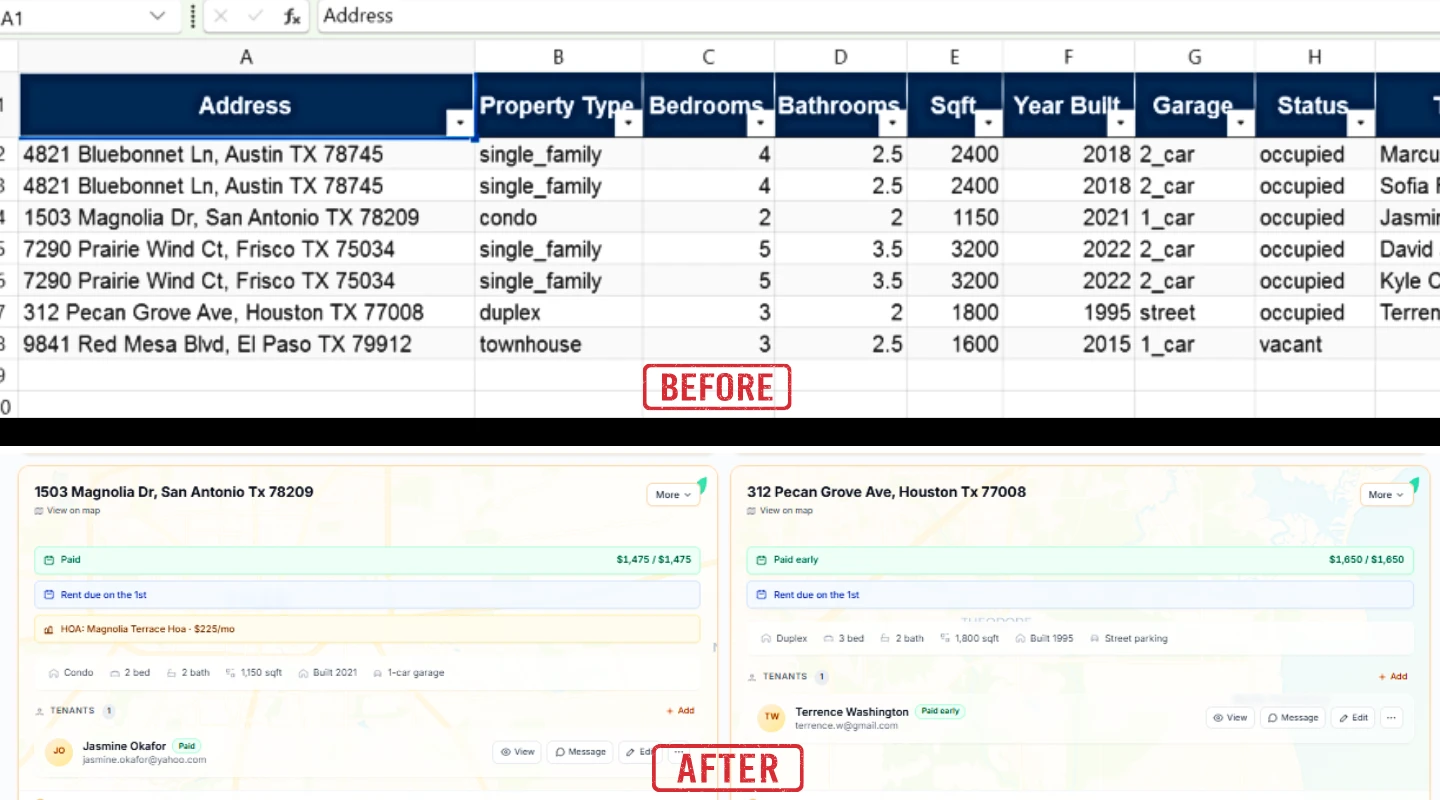
What is the best way to manage rental properties for small landlords?
For independent landlords with 1–50 units, the workflow that actually holds up is built on three habits:
A single source of truth for tenants and payments. One system that holds the lease, the payment history, the contact info, the maintenance log. Not a spreadsheet plus a notes app plus an email folder.
Automation for the recurring tasks. Rent reminders, late notices, lease-end reminders. These are calendar items, not decisions. They should run on autopilot.
A clean monthly check-in. 15–30 minutes once a month to review what came in, what's late, what needs follow-up. If your monthly check-in takes more than 30 minutes, your system is wrong.
The simplest setup that delivers all three is dedicated property management software with a tenant portal. PropertyLens is built for this exact landlord — the one who owns 1–15 units and wants the workflow to take a half-hour a month.
What features do you actually need from property management software?
Most "industry standard" property management platforms try to sell you features built for institutional operators (general ledger accounting, syndication, marketing portals). Independent landlords don't need 80% of it.
What you actually need:
| Feature | Why it matters | Spreadsheet equivalent |
|---|---|---|
| Rent tracking with status | See who paid, who didn't, who's partial — at a glance | Manual cell coloring |
| Tenant portal | Tenants self-serve payments and requests | Email back-and-forth |
| Automated reminders | Reduces late rent without nagging | Manual emails |
| Lease document storage | Pull up any lease in 5 seconds | "Where did I save it?" |
| Maintenance request log | Track open issues to closure | Sticky notes / texts |
| Late-fee automation | Apply per-lease rules without thinking | Manual math |
| Tax summary export | One-click Schedule E numbers | April spreadsheet rebuild |
What you do not need (despite what enterprise tools push):
- General ledger / chart of accounts (your CPA does this)
- Syndication to listing sites (use Zillow / Apartments.com directly)
- Marketing landing pages per unit (over-engineered for small portfolios)
- Multi-entity ownership structures (overkill until you have 100+ doors)
If a tool's pricing scales by features you don't use, you're paying enterprise prices for a small-landlord problem.
How do you migrate from a spreadsheet to property management software?
The migration is less painful than landlords expect. Plan for two hours, not two days.
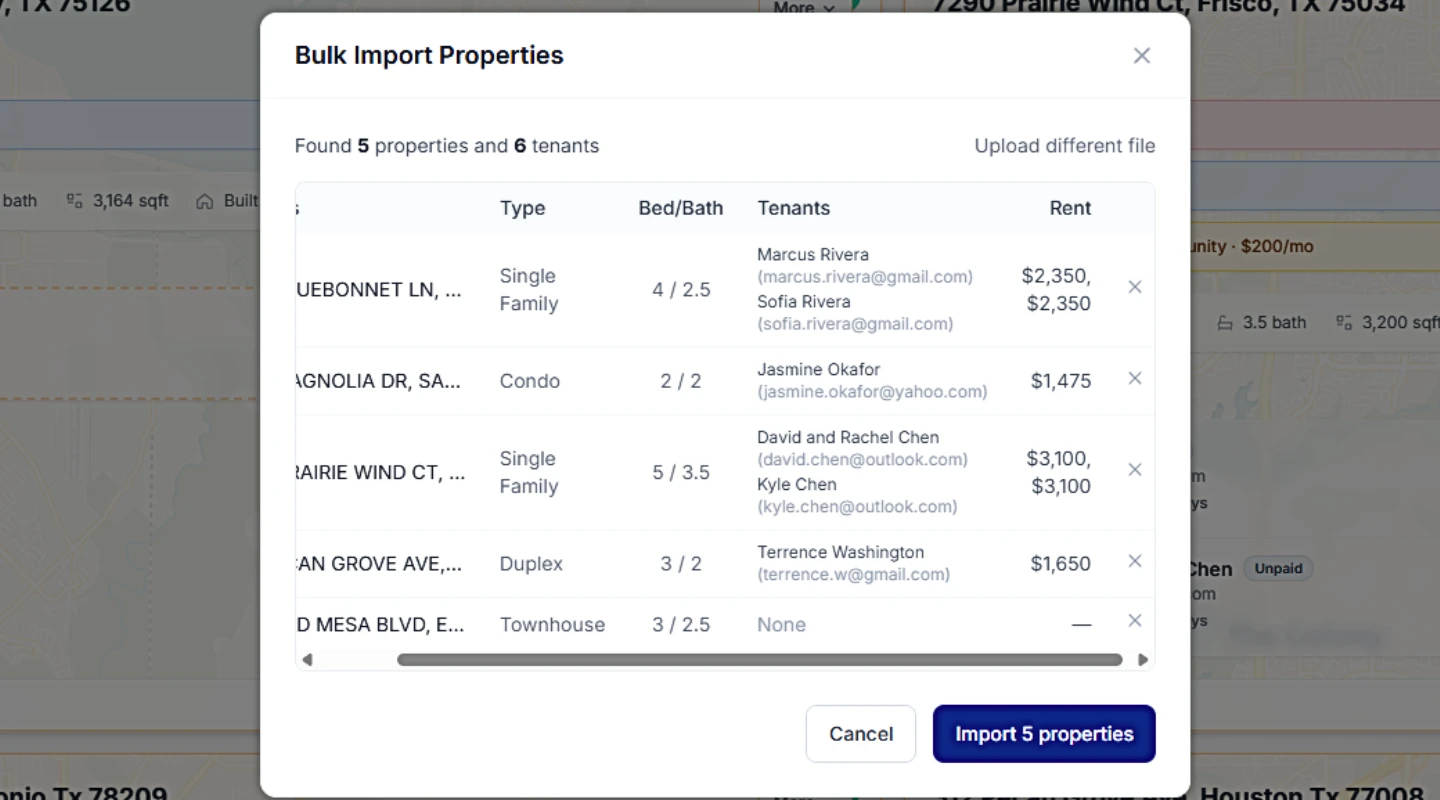
Step 1 — Export your tenant list. Save your current "tenants" sheet as CSV. Most software (PropertyLens included) imports tenants directly from a CSV with columns for name, email, property, unit, lease start, lease end, monthly rent, and security deposit.
Step 2 — Decide on payment history depth. You don't need to import 10 years of payments. Most landlords import the last 12 months, which is what tenants actually reference and what tax season needs. Older history can stay in the archived spreadsheet.
Step 3 — Set up properties first, then tenants. Create the property/unit records first so tenants land in the right place when imported.
Step 4 — Verify one tenant manually before bulk import. Add one tenant by hand, confirm the data shows up correctly, then run the bulk import for the rest. This catches column-mapping mistakes before they multiply.
Step 5 — Invite tenants to the portal last. Once your data is clean, send portal invites. Tenants get email access to their own ledger through the portal. From the next month forward, the data captures itself.
How long does it take to manage rentals once you're off spreadsheets?
This is the part most landlords don't believe until they see it.
A typical 5-unit landlord on spreadsheets spends 4–6 hours a month on:
- Sending rent reminders (~45 min)
- Recording payments and updating status (~60 min)
- Following up on late tenants (~30–60 min)
- Logging maintenance requests from texts/calls (~30 min)
- Updating the spreadsheet for any change (~30 min)
- April: rebuilding the tax summary (multiplied by panic)
The same landlord on dedicated software spends 30–45 min a month:
- Glance at the dashboard (~5 min)
- Confirm/record any offline payments (~5 min)
- Reply to maintenance requests (~10–15 min)
- Send any one-off messages (~5–10 min)
- April: click "export tax summary" (~2 min)
That's not a marketing pitch — it's the difference between manual workflow and automated workflow. The reminders, status flipping, and document storage all happen without you.
What are the alternatives to PropertyLens?
Honest answer: there are several, and the right one depends on your portfolio.
- Buildium / AppFolio — full-featured, built for property managers with 50+ doors. Powerful but expensive and complex for a 5-unit landlord.
- Avail / TurboTenant — landlord-focused, decent free tier, oriented heavily toward tenant screening and rent collection. Less depth on documents, compliance, and AI workflows.
- Stessa — strong on accounting and tax tracking, lighter on tenant communication and maintenance.
- PropertyLens — built for independent landlords with 1–50 units. Free for one property forever, AI-assisted lease analysis and messaging, document vault, state-specific compliance alerts. See pricing →
The right pick is whichever one you'll actually use every month. The most expensive software in the world is the one that sits unused while you keep limping along on a spreadsheet.
How do I know if I'm ready to switch?
If two or more of these are true, you're ready:
- You've forgotten to follow up on a late tenant in the last six months.
- You can't tell me right now, without checking, when each lease ends.
- You spend more than an hour a month on rent tracking alone.
- A tenant has asked for a payment receipt and you had to dig through bank statements.
- You dread tax season because rebuilding the income summary takes a weekend.
If none of those are true and you have one or two units, the spreadsheet is fine. Don't fix what works.
If you want to try moving off spreadsheets, PropertyLens is free for your first property — no credit card, no time pressure. Test it for a month and see if the workflow fits how you actually operate.
Ready to stop juggling spreadsheets?
PropertyLens tracks rent, manages tenants, and handles maintenance — free for your first property.
Start freeFrequently asked questions
When should I stop using spreadsheets to manage rentals?
Three signals: (1) you have more than 4–5 units, (2) tenants are asking for payment receipts you can't easily generate, or (3) you spend more than an hour a month on rent tracking, reminders, and follow-ups. Past that point, spreadsheets cost more time than they save.
Is property management software worth it for one or two properties?
If the software has a free tier, yes — even at one property the tenant portal, automated reminders, and tax-ready summaries save more time than they take to set up. If the cheapest plan is $40+/month, a spreadsheet is fine until you scale up.
Can I move my rental data from a spreadsheet to software easily?
Yes. Most platforms (PropertyLens included) accept a CSV or Excel import for tenants and historical payments. Plan on 30–60 minutes for the import, plus another hour to verify everything matches.
What about Google Sheets vs Excel for landlords?
Google Sheets has the edge for landlords because it's cloud-synced (no "which laptop has the file?" problem) and easier to share with a partner or accountant. But it has the same scale ceiling as Excel — both break down past 5–6 units.
Will I lose anything by switching from a spreadsheet?
Mostly only the parts you customized for yourself — color schemes, custom formulas, pet category columns. The data itself transfers fine. Most landlords end up keeping their old spreadsheet as an archive and never opening it again.